
Blog / Article

How to Prepare Your Healthcare Website for Google's 2MB Crawl Limit

Shan Serran
Shan Serran
April 21, 2026

Google began rolling out the March 2026 core update in late March, and the healthcare sector got hit harder than most industries.

Early volatility data from the March 2026 update suggests healthcare remains one of the most impacted sectors, continuing a trend of high turbulence for local medical keywords. Whether you are managing a multi-specialty hospital system, a private doctor's office, a home health and hospice agency, or a high-growth healthcare SaaS platform, your search visibility has become significantly more fragile.

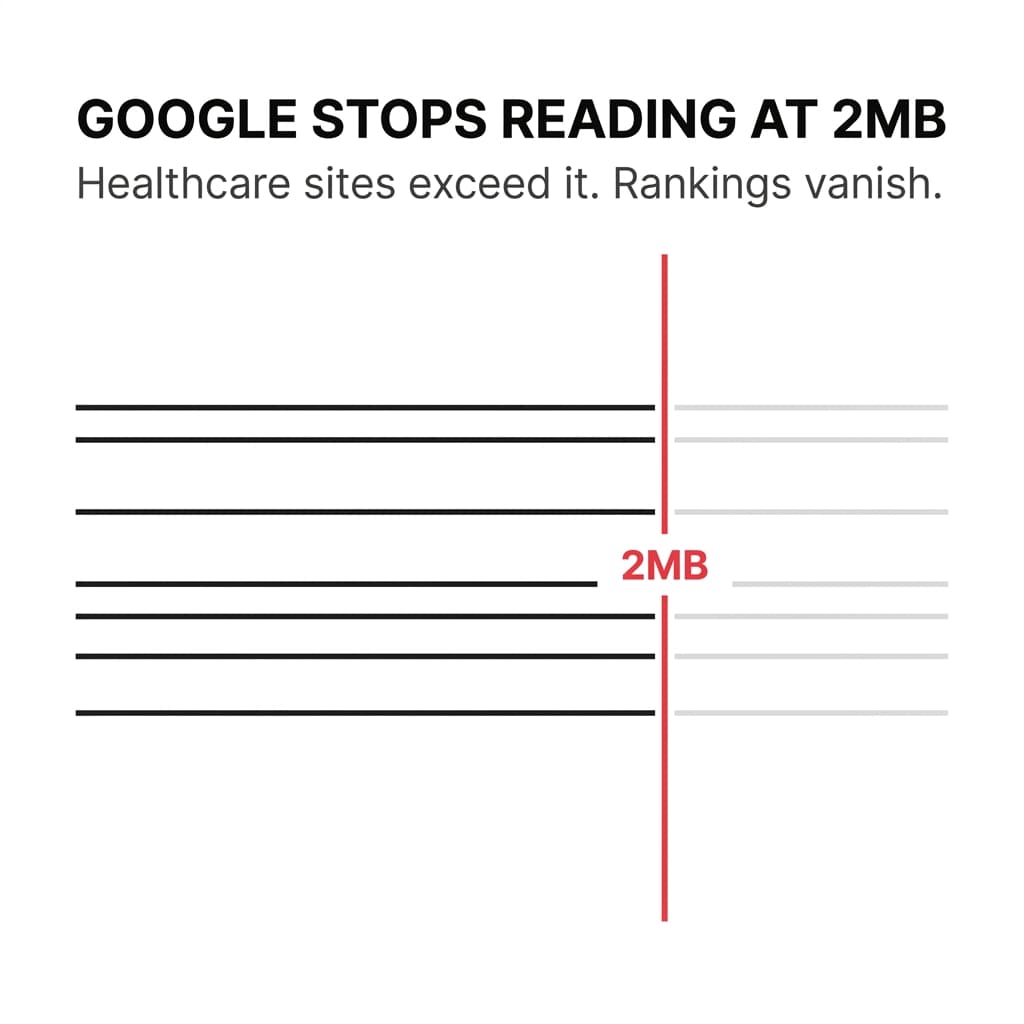
But there's a technical constraint most healthcare organizations don't know about: Google now processes only the first 2MB of your HTML files for indexing.

This isn't a penalty. It's a hard limit. When your page exceeds 2MB, Google stops reading—no warning, no error in Search Console, no alert. Your important content just gets truncated.

For healthcare websites with embedded patient resources, staff directories, compliance disclosures, and bloated code, this creates a silent visibility problem. So, bloated HTML doesn't just waste crawl budget; it exhausts your indexing budget before Google even reaches your call-to-action.
article cover

Why the 2MB Limit Matters for Healthcare Organizations

The median HTML page is only 33KB—about 60 times smaller than Google's limit. Most sites won't hit 2MB.

But healthcare websites are different.

You're operating under regulatory constraints that require specific disclosures, privacy notices, and compliance language. You're managing diverse service lines—from home health, hospice, and skilled nursing to specialized hospital departments and private doctor offices—each with its own complex content requirements. Whether you're embedding patient intake forms, HIPAA-compliant SaaS interfaces, or extensive staff directories and testimonials, the volume of location-specific information can quickly push your site toward technical limits.

Add outdated CMS platforms, legacy code, and third-party scripts, and page weight grows fast.

When your page exceeds 2MB, Google's crawler hits the limit mid-page. Everything after that point—service descriptions, contact information, trust signals—becomes invisible to search engines.

You lose rankings without knowing why.

How to Check If Your Pages Exceed the 2MB Limit

Start with your highest-traffic service pages and location pages. These are the pages driving patient inquiries and admissions.

Here's how to check page size:

Method 1: Browser Developer Tools

  1. Open the page in Chrome or Firefox
  2. Right-click and select "Inspect"
  3. Go to the "Network" tab
  4. Refresh the page
  5. Look at the "Size" column for the main HTML document

If the HTML file shows anything close to 1.5MB or higher, you have a problem.

Method 2: Online Page Size Checkers

Tools like GTmetrix, Pingdom, or WebPageTest will show total page weight and individual file sizes. Focus on the HTML document size, not total page weight (which includes images, CSS, and JavaScript).

Method 3: Search Console (Indirect Signal)

Google won't tell you directly when pages exceed the limit, but if you see pages with declining impressions, stable click-through rates, and no manual actions, page weight could be the hidden cause.

What Bloats Healthcare Pages Past the 2MB Limit

Most healthcare organizations don't intentionally create massive HTML files. The bloat accumulates over time through:

Inline CSS and JavaScript
When styles and scripts are embedded directly in the HTML instead of external files, page size grows fast. Legacy CMS platforms and page builders often generate bloated inline code.

Embedded Content and Iframes
Patient portals, insurance verification tools, and third-party booking widgets add significant weight when embedded directly in the page.

Excessive Staff Directories
Listing 50+ staff members with full bios, credentials, and photos on a single page creates unnecessary bulk. Google doesn't need all that information on one URL.

Compliance and Legal Disclosures
HIPAA notices, privacy policies, and state-specific disclaimers are necessary, but embedding full legal text on every service page inflates file size.

Uncompressed or Redundant Code
Outdated CMS platforms generate repetitive HTML. Plugins and add-ons layer additional code without cleanup.

Multiple Location Listings on One Page
If you operate across multiple counties or regions and list every location on a single "Locations" page, you're creating a crawl liability.

How to Reduce Page Weight Without Losing Content

You don't need to delete important information. You need to restructure how it's delivered because reducing weight allows Google to "see" your unique insights and original data, which are now primary ranking signals.

1. Move CSS and JavaScript to External Files

Inline styles and scripts should be moved to external .css and .js files. This keeps the HTML lean while maintaining functionality. Most modern CMS platforms support this, but legacy systems may require developer intervention.

2. Use Lazy Loading for Non-Critical Content

Staff bios, testimonials, and secondary service details can load dynamically as users scroll. This keeps the initial HTML file small while still delivering full content to visitors.

3. Break Large Pages into Focused Subpages

Instead of one massive 'Services' page, create individual, high-performance pages for each specific service line or category. This applies whether you are managing home health, hospice, palliative care, and skilled nursing, or overseeing complex hospital departments, specialized doctor offices, and healthcare SaaS features. Google prefers these specific, focused pages over sprawling directories, as they allow for deeper technical optimization and clearer 'Information Gain' signals.

The March 2026 update confirmed this—Google is favoring service-specific pages over general location directories.

Webflow Exclusive: Use Advanced Publishing Options

If your site is built on Webflow, you have a distinct advantage in tackling the 2MB limit. In the Advanced Publishing section of your Site Settings, ensure that "Optimize CSS" and "Global CSS/JS minification" are toggled on.

More importantly, for the March 2026 update, use Webflow’s Page-Specific CSS feature. By default, Webflow can bundle styles for your entire site into every page. Enabling page-specific styling strips out code that isn't needed for that specific service page, drastically reducing your HTML footprint and ensuring Googlebot reaches your most important heal

4. Link to Legal Disclosures Instead of Embedding Them

HIPAA notices, privacy policies, and compliance language should live on dedicated pages, not embedded in full on every service page. Link to them in the footer.

5. Compress and Minify HTML

Remove unnecessary whitespace, comments, and redundant code. Most CMS platforms and hosting providers offer HTML minification as a standard feature.

6. Audit Third-Party Scripts and Embeds

Every chat widget, analytics tag, and booking tool adds weight. Review what's actually driving patient inquiries and remove what's not.

Why Page Weight Also Hurts Crawl Efficiency

The 2MB limit isn't the only reason to care about page weight.

Heavy pages slow down crawling. When Googlebot processes your site, it has a limited crawl budget—the number of pages it will crawl in a given session. Heavy pages take longer to process, which means fewer pages get crawled overall.

For healthcare organizations with multiple service lines, locations, and content updates, this creates a visibility gap. New pages take longer to get indexed. Updated content takes longer to rank.

JavaScript-heavy pages amplify the problem. When Googlebot has to wait for scripts to render before indexing content, crawling slows or stalls entirely.

Fast, lean pages get crawled more often. Bloated pages get deprioritized.

How This Connects to the March 2026 Core Update

Google's core updates don't penalize specific sites. They adjust what's needed to rank well across dozens of factors simultaneously.

The March update reinforced that page experience and crawlability matter more than ever. Health websites that couldn't be efficiently crawled saw ranking instability. Sites with clear, focused service pages gained ground.

Google also expanded E-E-A-T (Experience, Expertise, Authoritativeness, Trustworthiness) requirements beyond traditional YMYL content to practically all competitive searches. This means your content needs to be written or reviewed by credentialed healthcare professionals—and Google needs to be able to crawl and process that content efficiently.

If your pages exceed the 2MB limit, Google might not even see the author credentials or expertise signals you've embedded.

Using Webflow CMS collections allows you to inject unique 'Information Gain' signals—like specific practitioner insights or local clinic data—that the March 2026 update rewards.

What to Do Right Now

Start with your top 10 service and location pages. These are the pages driving patient inquiries and admissions.

Check their HTML file size using the methods above. If any page is above 1.5MB, prioritize reducing it.

Focus on:

  • Moving inline CSS and JavaScript to external files
  • Breaking large pages into focused subpages
  • Removing or lazy-loading non-critical content
  • Linking to legal disclosures instead of embedding them

If your team doesn't have the technical capacity to handle this internally, this is where an external healthcare marketing partner becomes necessary like Veewz. Page weight issues require developer-level intervention, and mistakes in regulated healthcare environments carry real risk.

The 2MB limit isn't going away. Google confirmed the limit may change as the web evolves, but there's no indication it will increase anytime soon.

For healthcare organizations dependent on search visibility for patient acquisition, this is a structural issue that needs to be addressed now—not after the next core update hits.

Final Thought

Most healthcare organizations won't know they have a page weight problem until rankings drop.

By then, recovery takes months. Google's core updates typically run every 3-4 months, and full recovery often requires waiting for the next broad update to confirm your site is producing helpful, reliable content long-term.

You can't afford reactive fixes in regulated healthcare environments. The cost is too high—lost patient inquiries, missed admissions, and revenue gaps that directly impact census targets.

If you're unsure whether your website has page weight issues, or if you need help structuring a compliant, crawlable healthcare site, get a free consultation. No pressure. Just clarity on what's actually affecting your search visibility.

About the Author

Shan Serran

With experience of over 10 years in Digital Marketing, Shan has been helping businesses with SEO, SEM, and Social Media. He founded Veewz with the vision of providing transparency in the delivery of digital marketing services and better options for businesses of all sizes and domains. When he’s not working, Shan loves to spend time with his family, watch movies and support his favorite team the San Francisco Giants.

How to Prepare Your Healthcare Website for Google's 2MB Crawl Limit

Shan Serran
April 21, 2026
|

Google began rolling out the March 2026 core update in late March, and the healthcare sector got hit harder than most industries.

Early volatility data from the March 2026 update suggests healthcare remains one of the most impacted sectors, continuing a trend of high turbulence for local medical keywords. Whether you are managing a multi-specialty hospital system, a private doctor's office, a home health and hospice agency, or a high-growth healthcare SaaS platform, your search visibility has become significantly more fragile.

But there's a technical constraint most healthcare organizations don't know about: Google now processes only the first 2MB of your HTML files for indexing.

This isn't a penalty. It's a hard limit. When your page exceeds 2MB, Google stops reading—no warning, no error in Search Console, no alert. Your important content just gets truncated.

For healthcare websites with embedded patient resources, staff directories, compliance disclosures, and bloated code, this creates a silent visibility problem. So, bloated HTML doesn't just waste crawl budget; it exhausts your indexing budget before Google even reaches your call-to-action.

article cover

Why the 2MB Limit Matters for Healthcare Organizations

The median HTML page is only 33KB—about 60 times smaller than Google's limit. Most sites won't hit 2MB.

But healthcare websites are different.

You're operating under regulatory constraints that require specific disclosures, privacy notices, and compliance language. You're managing diverse service lines—from home health, hospice, and skilled nursing to specialized hospital departments and private doctor offices—each with its own complex content requirements. Whether you're embedding patient intake forms, HIPAA-compliant SaaS interfaces, or extensive staff directories and testimonials, the volume of location-specific information can quickly push your site toward technical limits.

Add outdated CMS platforms, legacy code, and third-party scripts, and page weight grows fast.

When your page exceeds 2MB, Google's crawler hits the limit mid-page. Everything after that point—service descriptions, contact information, trust signals—becomes invisible to search engines.

You lose rankings without knowing why.

How to Check If Your Pages Exceed the 2MB Limit

Start with your highest-traffic service pages and location pages. These are the pages driving patient inquiries and admissions.

Here's how to check page size:

Method 1: Browser Developer Tools

  1. Open the page in Chrome or Firefox
  2. Right-click and select "Inspect"
  3. Go to the "Network" tab
  4. Refresh the page
  5. Look at the "Size" column for the main HTML document

If the HTML file shows anything close to 1.5MB or higher, you have a problem.

Method 2: Online Page Size Checkers

Tools like GTmetrix, Pingdom, or WebPageTest will show total page weight and individual file sizes. Focus on the HTML document size, not total page weight (which includes images, CSS, and JavaScript).

Method 3: Search Console (Indirect Signal)

Google won't tell you directly when pages exceed the limit, but if you see pages with declining impressions, stable click-through rates, and no manual actions, page weight could be the hidden cause.

What Bloats Healthcare Pages Past the 2MB Limit

Most healthcare organizations don't intentionally create massive HTML files. The bloat accumulates over time through:

Inline CSS and JavaScript
When styles and scripts are embedded directly in the HTML instead of external files, page size grows fast. Legacy CMS platforms and page builders often generate bloated inline code.

Embedded Content and Iframes
Patient portals, insurance verification tools, and third-party booking widgets add significant weight when embedded directly in the page.

Excessive Staff Directories
Listing 50+ staff members with full bios, credentials, and photos on a single page creates unnecessary bulk. Google doesn't need all that information on one URL.

Compliance and Legal Disclosures
HIPAA notices, privacy policies, and state-specific disclaimers are necessary, but embedding full legal text on every service page inflates file size.

Uncompressed or Redundant Code
Outdated CMS platforms generate repetitive HTML. Plugins and add-ons layer additional code without cleanup.

Multiple Location Listings on One Page
If you operate across multiple counties or regions and list every location on a single "Locations" page, you're creating a crawl liability.

How to Reduce Page Weight Without Losing Content

You don't need to delete important information. You need to restructure how it's delivered because reducing weight allows Google to "see" your unique insights and original data, which are now primary ranking signals.

1. Move CSS and JavaScript to External Files

Inline styles and scripts should be moved to external .css and .js files. This keeps the HTML lean while maintaining functionality. Most modern CMS platforms support this, but legacy systems may require developer intervention.

2. Use Lazy Loading for Non-Critical Content

Staff bios, testimonials, and secondary service details can load dynamically as users scroll. This keeps the initial HTML file small while still delivering full content to visitors.

3. Break Large Pages into Focused Subpages

Instead of one massive 'Services' page, create individual, high-performance pages for each specific service line or category. This applies whether you are managing home health, hospice, palliative care, and skilled nursing, or overseeing complex hospital departments, specialized doctor offices, and healthcare SaaS features. Google prefers these specific, focused pages over sprawling directories, as they allow for deeper technical optimization and clearer 'Information Gain' signals.

The March 2026 update confirmed this—Google is favoring service-specific pages over general location directories.

Webflow Exclusive: Use Advanced Publishing Options

If your site is built on Webflow, you have a distinct advantage in tackling the 2MB limit. In the Advanced Publishing section of your Site Settings, ensure that "Optimize CSS" and "Global CSS/JS minification" are toggled on.

More importantly, for the March 2026 update, use Webflow’s Page-Specific CSS feature. By default, Webflow can bundle styles for your entire site into every page. Enabling page-specific styling strips out code that isn't needed for that specific service page, drastically reducing your HTML footprint and ensuring Googlebot reaches your most important heal

4. Link to Legal Disclosures Instead of Embedding Them

HIPAA notices, privacy policies, and compliance language should live on dedicated pages, not embedded in full on every service page. Link to them in the footer.

5. Compress and Minify HTML

Remove unnecessary whitespace, comments, and redundant code. Most CMS platforms and hosting providers offer HTML minification as a standard feature.

6. Audit Third-Party Scripts and Embeds

Every chat widget, analytics tag, and booking tool adds weight. Review what's actually driving patient inquiries and remove what's not.

Why Page Weight Also Hurts Crawl Efficiency

The 2MB limit isn't the only reason to care about page weight.

Heavy pages slow down crawling. When Googlebot processes your site, it has a limited crawl budget—the number of pages it will crawl in a given session. Heavy pages take longer to process, which means fewer pages get crawled overall.

For healthcare organizations with multiple service lines, locations, and content updates, this creates a visibility gap. New pages take longer to get indexed. Updated content takes longer to rank.

JavaScript-heavy pages amplify the problem. When Googlebot has to wait for scripts to render before indexing content, crawling slows or stalls entirely.

Fast, lean pages get crawled more often. Bloated pages get deprioritized.

How This Connects to the March 2026 Core Update

Google's core updates don't penalize specific sites. They adjust what's needed to rank well across dozens of factors simultaneously.

The March update reinforced that page experience and crawlability matter more than ever. Health websites that couldn't be efficiently crawled saw ranking instability. Sites with clear, focused service pages gained ground.

Google also expanded E-E-A-T (Experience, Expertise, Authoritativeness, Trustworthiness) requirements beyond traditional YMYL content to practically all competitive searches. This means your content needs to be written or reviewed by credentialed healthcare professionals—and Google needs to be able to crawl and process that content efficiently.

If your pages exceed the 2MB limit, Google might not even see the author credentials or expertise signals you've embedded.

Using Webflow CMS collections allows you to inject unique 'Information Gain' signals—like specific practitioner insights or local clinic data—that the March 2026 update rewards.

What to Do Right Now

Start with your top 10 service and location pages. These are the pages driving patient inquiries and admissions.

Check their HTML file size using the methods above. If any page is above 1.5MB, prioritize reducing it.

Focus on:

  • Moving inline CSS and JavaScript to external files
  • Breaking large pages into focused subpages
  • Removing or lazy-loading non-critical content
  • Linking to legal disclosures instead of embedding them

If your team doesn't have the technical capacity to handle this internally, this is where an external healthcare marketing partner becomes necessary like Veewz. Page weight issues require developer-level intervention, and mistakes in regulated healthcare environments carry real risk.

The 2MB limit isn't going away. Google confirmed the limit may change as the web evolves, but there's no indication it will increase anytime soon.

For healthcare organizations dependent on search visibility for patient acquisition, this is a structural issue that needs to be addressed now—not after the next core update hits.

Final Thought

Most healthcare organizations won't know they have a page weight problem until rankings drop.

By then, recovery takes months. Google's core updates typically run every 3-4 months, and full recovery often requires waiting for the next broad update to confirm your site is producing helpful, reliable content long-term.

You can't afford reactive fixes in regulated healthcare environments. The cost is too high—lost patient inquiries, missed admissions, and revenue gaps that directly impact census targets.

If you're unsure whether your website has page weight issues, or if you need help structuring a compliant, crawlable healthcare site, get a free consultation. No pressure. Just clarity on what's actually affecting your search visibility.

Author Bio

Shan Serran

With experience of over 10 years in Digital Marketing, Shan has been helping businesses with SEO, SEM, and Social Media. He founded Veewz with the vision of providing transparency in the delivery of digital marketing services and better options for businesses of all sizes and domains. When he’s not working, Shan loves to spend time with his family, watch movies and support his favorite team San Francisco Giants.

Do not sell my info